
It is Tuesday afternoon and your tile crew is booked for Thursday. You need the homeowner to confirm the shower niche before you can order the pan. You texted three options Friday, called Monday and got voicemail, emailed this morning. Nothing. The material is not ordered and the clock on their Thursday slot is running. By Wednesday night you are moving the crew to another job and pushing your whole schedule a week to the right. The homeowner was not angry and was not ghosting you on purpose. They just went quiet, and your job stopped moving while they did.
Here is the short version. Clients do not go silent because they stopped caring. They go silent at predictable decision points, when a choice feels too big, too confusing, or too loaded with money, so they freeze and avoid you instead of picking. The silence costs you real money: idle crews, re-ordered subs, delayed draws, and a schedule that slides a week every time a decision sits. The fix is not nagging harder. Give every decision a hard deadline, shrink the choice to something a tired person can make from their phone, and set up an automatic nudge that pulls a quiet client back before your crew is standing in the driveway. This post walks the six moments clients go quiet, what each costs, and the exact messages that get them responding.
In this post
- What the silence is actually costing you
- Why clients freeze instead of answering
- The six moments clients go quiet
- How one stalled decision snowballs
- Steal this: the messages that pull a quiet client back
- Run it three ways: solo, mid-size, and large
- The rules on texting homeowners and signing changes
- Common objections
- Frequently asked questions
- Sources
What the silence is actually costing you
A quiet client does not feel expensive in the moment. Nobody sends you an invoice for the week your job sat waiting on a paint color, so builders treat it as a soft cost. It is not soft, and it hides because it never lands on one line. Walk it through on one stalled decision. The crew is scheduled Thursday and the client has not confirmed the finish, so you cannot order material. If the crew shows up with nothing to do, you eat a day of labor. If you cancel them, you lose your slot and wait ten days for their next opening. The sub lined up for the next phase gets bumped too, because the phases stack. And the draw tied to that phase does not go out, so the money you already spent on material is floating on your own card.
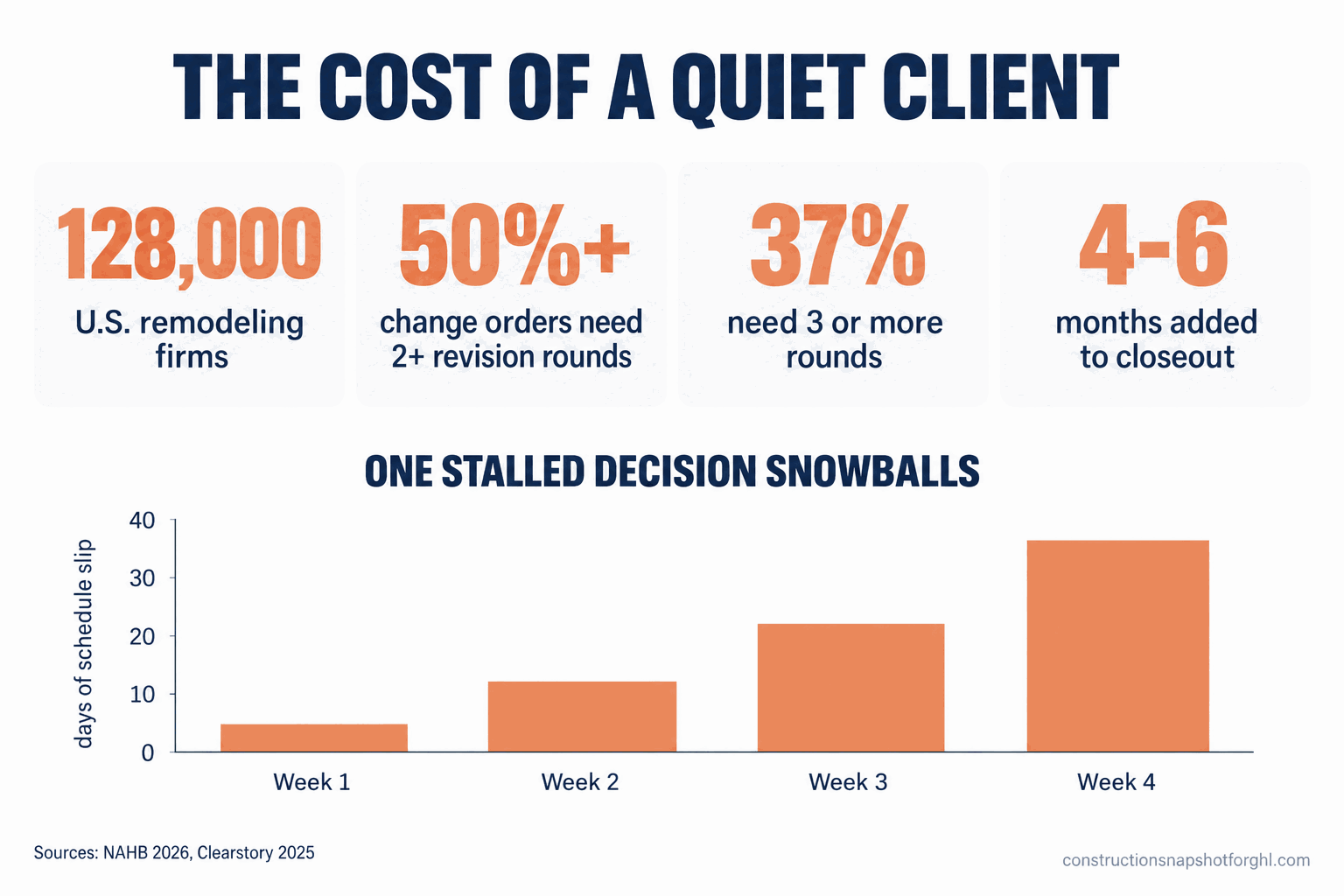
Your client also has options and a long memory. There were 128,000 remodeling firms in the U.S. at the start of 2025, nearly double the count in 2000, per the National Association of Home Builders. GuildQuality, which analyzes feedback from more than 100,000 homeowners a year, frames clear communication as what protects the relationship when problems hit (GuildQuality), so a job that stalls and goes tense is how a five-star review becomes a three. The back-and-forth is slow too: Clearstory’s 2025 report found more than half of change-order reports need at least two rounds of revision and 37 percent take three or more (Clearstory via CURT, 2025). Every round is a chance for the client to go quiet.
Why clients freeze instead of answering
The mechanism tells you what to change. A homeowner is not a project manager. This is the biggest financial decision of their year, done on top of a full life, and every message from you asks them to spend money, commit to something permanent, or confront a problem. People avoid those feelings, and the avoidance looks like silence.
Three things reliably trigger the freeze. The decision feels too big or too permanent, so they stall to avoid getting it wrong. It is confusing, too many options and no clear recommendation, so they set it aside for “when they have time,” which never comes. Or the message carries bad news or a bill, so they go dark rather than accept it. Notice what is not on the list: not caring. Almost nobody spending six figures on their home stops caring, they are overwhelmed. You do not fix overwhelm with a louder email. You fix it by making the decision smaller, clearer, and time-boxed, and the nudge automatic.
The six moments clients go quiet
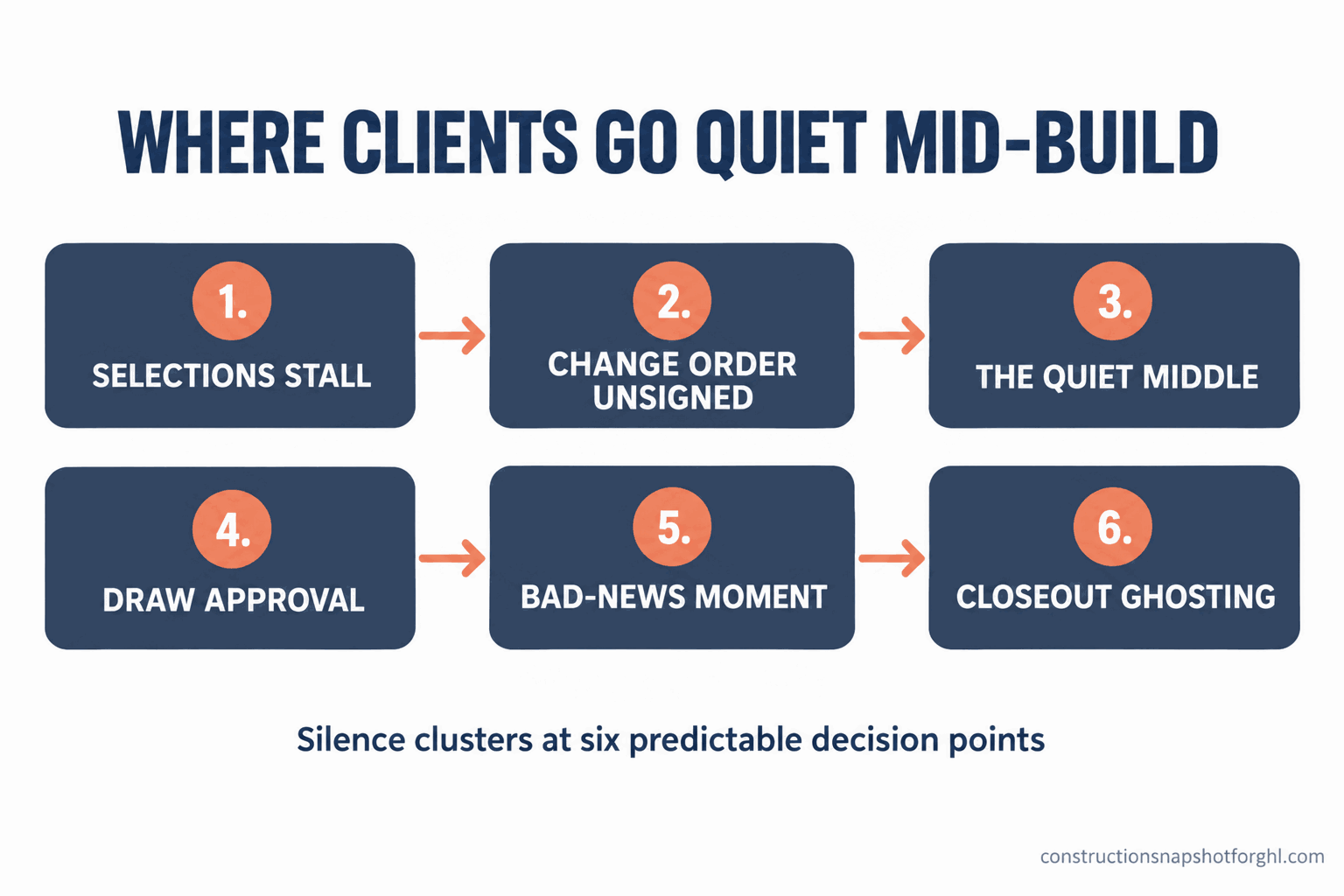
Silence clusters at six points on a residential build or remodel. Here is each one: why it happens, how it breaks your job, and what it costs.
1. The selection that stalls the build
The most common freeze. The client has three tile options and no deadline, and the crew-scheduling stakes are invisible on their end. The decision sits past the point where you can order and still hit the install date, so you idle or bump the crew and the finish sequence slides. The cost: a lost crew day plus a rescheduling gap that can slide the job a full week. A real selections process with dated deadlines prevents most of them.
2. The change order they will not sign
You found rotten subfloor, or they asked for the bigger island. Now there is a price and a signature in front of them, and they know signing means paying. The crew hits the changed area and stops, because building past an unsigned change order means work you may never get paid for. The cost: a stoppage at the exact spot the change touches. Present it as a clean decision, not a bill, with a real change-order approval process.
3. The long middle, when nothing visible is happening
Framing to drywall is the stretch where the house stops looking different day to day. They texted daily during demo; now they go quiet and you read it as “everything is fine.” The silence rots trust: they assume no news is bad news and surface later ready to question everything. The cost: not a schedule hit but a relationship hit, showing up as scope-questioning, slow approvals, and a worse review. A simple status-update rhythm keeps the trust intact.
4. The draw or payment approval
On a lender-funded build the inspector signs off; on a cash job you wait on the homeowner to approve and pay the progress draw. Money makes people slow, and you have already paid the subs and supplier for that phase, so until the draw clears you are financing the build. The cost: direct cash-flow pain. Clearstory found 58 percent of specialty contractors say approval delays hit cash flow at least occasionally (Clearstory via CURT, 2025). A clear draw schedule tied to visible milestones removes the “is it really done” argument.
5. The bad-news moment
A delay, an overage, a discontinued product, a mistake. You dread telling them, so you wait, and meanwhile they sense something is off and go quiet too. A two-day delay you mention same-day is a shrug; the same delay they discover three weeks later is a trust breach. The cost: this is the one that becomes a bad review or a withheld payment. Say it fast and bring the fix with the problem.
6. Punch-list and closeout ghosting
The job is basically done, they have moved back in, and now you cannot get them to walk the punch list or release the final payment and retainage. Your final draw is stuck behind a walkthrough they keep not scheduling, and the crew has moved on, so every callback is a special trip. The cost: the last 5 percent is always the hardest money to collect. A dated closeout step with a scheduled walkthrough and a final-payment trigger gets you paid while the job is fresh.
How one stalled decision snowballs
People picture a single lost day. It is never a single day, because phases stack: one stalled selection pushes the install, which pushes the next trade, which pushes the draw. Here is an illustrative example of how one quiet decision compounds over four weeks on a mid-size remodel. The numbers are a worked example, not a survey figure, but the shape is one every builder recognizes.
Illustrative example: cumulative calendar days of schedule slip from one stalled decision as downstream trades restack. It squares with Clearstory’s 2025 finding that nearly half of GCs saw change-order delays add four to six months to closeout (Clearstory via CURT, 2025).
Steal this: the messages that pull a quiet client back
Here is the actual copy. The pattern is the same across all of them: one decision, a hard deadline, a visible consequence, and an ask small enough to answer from a phone. “Let me know your thoughts” is an open loop that invites silence; “reply B by Wednesday 5pm or the crew moves” is a closed loop people answer. Swap in your own names and dates.
The stalled selection (fires 48 hours before the order deadline):
Hi [First name], quick one on the primary bath. To keep the tile crew Thursday I need the shower tile picked by Wed 5pm. My pick for your budget and look is Option B (the matte white 3x12). Reply “B” and I’ll order today, or tell me which you want. If I don’t hear by Wed 5pm I’ll move the crew to the following week.
The change order that is sitting unsigned:
Hi [First name], the change order for the subfloor repair is ready to sign in your portal [link]. It’s $[amount] and adds [X] days. I can’t have the crew build over it until it’s signed, so they’ll be idle from [date] until it is. Want a 5-minute call today so I can walk you through it?
The long quiet middle (a scheduled update, no ask):
Hi [First name], week [N] update: rough-in plumbing and electric passed inspection today, insulation Monday, drywall the week after. No decisions needed right now, just keeping you in the loop. Photos in your portal. On track for [date].
The bad-news moment (same day, fix included):
Hi [First name], heads up: the vanity you picked got discontinued, so it won’t ship. I found two close matches in your price range [link] and can hold Thursday’s install if you pick by tomorrow noon. Sorry for the curveball. My recommendation is the first one.
The closeout walkthrough (job basically done):
Hi [First name], we’re down to the punch list. I’d like to walk it with you this week while the crew is still local. Does Thursday 9am or Friday 2pm work? After the walk we knock out the list, do the final draw, and you’re done.
Run it three ways: solo, mid-size, and large
The six moments are the same for everyone. The system you build should match your size.
Solo operator (6 to 12 jobs a year). You cannot chase decisions by hand when you are swinging a hammer, so your highest-impact move is the automatic nudge. Put every decision deadline into one tool the day you set the schedule and let it text the client 48 hours out. A two-way SMS setup that sends the nudge and drops the reply into your phone is the whole system.
Mid-size team (12 to 30 jobs a year). With overlapping jobs and a part-time admin, the failure mode is decisions living in your head where nobody else can act. Put every open decision, its deadline, and its owner in a pipeline your admin can work, so a real CRM and workflow setup escalates to a human only when the automatic nudge does not land.
Large builder (30 to 40+ jobs a year). At this volume silence is a portfolio problem. You need a dashboard of every stalled decision across every active job so a coordinator can work the list each morning. The six messages are the same, just templated and reported on. You want to know which of your 35 jobs is waiting on a client right now, without calling six PMs to find out.
The rules on texting homeowners and signing changes
Two legal points matter when you tighten this up, and both are easy to get right.
Texting clients is covered by TCPA. SMS to a client is regulated, so get clear consent to text (a line in your contract plus a checkbox on your intake form), only send project-related messages, and always honor a STOP reply. The Federal Communications Commission sets the consent and opt-out rules under the Telephone Consumer Protection Act (FCC, TCPA). For a one-client project text with prior consent this is low-drama.
Some states require change orders in writing. The unsigned-change-order freeze can be a legal problem, not just a cash one. Several states, California among them, require home-improvement contracts and their changes to be in writing and signed before the work is done (California Contractors State License Board). The signature you are waiting on is not optional paperwork. And if you ever sign a change in the homeowner’s house, the FTC Cooling-Off Rule gives them three business days to cancel a sale over $25 made at home (Federal Trade Commission), one more reason to send changes to a portal to sign.
Common objections
“My clients are just flaky.” A few are. Most are overwhelmed, and the same person who ignores a vague email will answer a yes/no text with a deadline in two minutes. Before you write a client off, check whether you gave them a decision they could make on a phone.
“Won’t automated reminders feel cold?” Only if they are generic. “The tile crew is holding Thursday for your pick” is respectful of a decision that matters to them, not annoying. The cold version is the silence.
“I already pay for a project-management tool. Doesn’t it do this?” Most tools store information beautifully and do nothing to move a decision along. A portal that holds the change order is not a system that texts the client 48 hours before the crew arrives and escalates if they do not reply. When a decision is due, does your tool reach out, or sit there waiting for the client to log in? The setup is a one-time cost and the silence is a weekly one, so front-load it, or install a system that is already built for it.
Frequently asked questions
Why clients go quiet mid-project: FAQ
Why do construction clients suddenly stop responding mid-build?
Almost always because a decision in front of them feels too big, too confusing, or too expensive, so they avoid it, and avoidance looks like silence. It clusters at six predictable points: selections, change-order approvals, the quiet middle, draw approvals, bad-news moments, and closeout. It is rarely that they stopped caring.
How much does a stalled client decision actually cost me?
More than the obvious lost crew day. Because phases stack, one quiet stretch bumps the crew, restacks the downstream trades, and delays the draw tied to that phase, so a single stalled decision can slide the whole job a week or more. The cost is in your schedule and cash flow, not just your inbox.
How do I get a homeowner to make a selection on time?
Give the decision a hard deadline tied to a visible consequence ('picked by Wednesday 5pm or the tile crew moves to next week'), shrink the choice to something answerable from a phone, and include your recommendation. Then enforce the deadline the first time, so they learn it is real.
Is it legal to send automated text reminders to my clients?
Yes, with consent. SMS to clients is governed by the TCPA, so get clear permission to text them (a contract line plus an intake checkbox), keep messages project-related, and honor any STOP reply.
Do I legally need a signed change order before doing the extra work?
In many states, yes. California and others require home-improvement contracts and their changes to be in writing and signed before the work is performed. Beyond the law, building over an unsigned change order is how contractors end up unable to collect, so get the signature first.
The bottom line
Your tile crew does not care that the homeowner was overwhelmed. They show up Thursday to an unanswered question and a day with no work, and you pay for it. Silence is not a people problem you have to live with, it is a system gap you can close. Name the six moments, give every decision a deadline and a consequence, shrink the ask, and automate the nudge. Do that and the quiet weeks stop sliding your schedule, your draws go out on time, and the client who used to go dark leaves you a five-star review instead.
Sources
- National Association of Home Builders, “Three States Drive Over 20% of Remodeling Activity,” 2026: 128,000 remodeling firms and state spending shares
- GuildQuality, “Communication: the key to problem resolution” (100,000+ homeowners analyzed annually): guildquality.com
- Clearstory 2025 State of Change Orders, via the Construction Users Roundtable: revision rounds and closeout delay data
- Federal Communications Commission, Telemarketing and Robocall rules (TCPA): fcc.gov
- California Contractors State License Board, contractor legal requirements: cslb.ca.gov
- Federal Trade Commission, Cooling-Off Rule: consumer.ftc.gov