
The framing crew is done, the trusses are up, and you are ready to start rough-in. Except you cannot, because the homeowners still have not picked their windows, and the window you spec drives the opening you frame. So the crew moves to another job, the schedule slips two weeks, and when you finally get the selection it is a bump-out casement that adds cost and a change order nobody wants to talk about. You did not lose those two weeks to weather or a no-show sub. You lost them to a decision that should have been made three months ago, sitting in a text thread the client keeps meaning to answer.
Here is the short version. A construction selections process is the system that gets every finish decision, from windows to cabinet pulls, made and locked before the build needs it, instead of chasing choices while the crew stands around. Done right, it works backward from lead times: every selection gets a real allowance, a drop-dead deadline tied to when the trade needs it, one place the decision is recorded, and a rule that says when a choice moves the price it becomes a signed change order before anything is ordered. Done wrong, or left to “we’ll figure it out as we go,” client indecision becomes your schedule problem and your margin problem at the same time. This post gives you the six-stage process, the exact reminder messages that get a stalled client to decide, and the rule that keeps allowance overages from turning into an argument at closeout.
In this post
- What a selections process actually is
- What late selections really cost you
- The six-stage selections process
- The selections schedule, drawn out
- Steal this: the selection reminder cadence
- Run it three ways: solo, mid-size, and large
- The rules that turn a selection into a legal document
- Common objections
- Frequently asked questions
- Sources
What a selections process actually is
A selections process is the part of your job that decides who picks what, by when, at what budget, and where it gets written down. On a custom home there are dozens of categories to choose, from flooring and cabinetry to plumbing fixtures, lighting, tile, hardware, and paint, and on a true custom build that means hundreds of individual finish decisions (Stauffer & Sons). Left unmanaged, those decisions arrive in whatever order the client feels like making them, which is almost never the order your build needs.
The distinction that matters is between a selection and an allowance. A selection is the actual product the client chooses: this faucet, that tile, these cabinets. An allowance is the dollar figure you carried in the contract for a category the client had not chosen yet, a placeholder so you could price the job before every product was picked. The selection either lands inside the allowance or it does not, and the gap is where most selection fights start.
A real process ties three things together that most builders keep separate: the build schedule (when each trade needs the product on site), the budget (the allowance for each category), and the decision (the client actually choosing). Keep them separate and you get the classic mess, where the client is agonizing over cabinet knobs while the window order that gates your framing sits untouched. Tie them together and selections stop being a taste conversation and start being a scheduling one, which is a conversation you can actually run.
What late selections really cost you
Start with the money, because it is bigger than most builders admit. In the Houzz 2026 U.S. Houzz & Home Study, 37 percent of remodeling projects exceeded their planned budget in 2025, against 35 percent that came in on target (Houzz). The reasons are a selections story. Thirty-five percent of homeowners who went over did so because they chose higher-end materials than they had planned, mid-project, and 31 percent expanded the scope of the work while it was underway (Houzz). Those are not construction problems. They are decisions made too late, and priced too late.
Share of over-budget remodeling homeowners citing each reason, Houzz 2026 U.S. Houzz & Home Study (fielded on 2025 projects). The two largest drivers, upgraded materials and expanded scope, are both selection decisions made after the contract was priced.
Then there is the schedule, which is where the pain lands on you rather than the client. Every late upgraded selection turns into a change order, and every change order carries a schedule hit while you re-quote, re-order, and re-sequence. The industry has watched this pattern for years: design and scope changes are consistently among the biggest single causes of both cost overruns and delays on construction projects, and rework driven by late client changes routinely runs a few percent of a project’s total cost before you count the lost days.
Now add the compounding cost. A stalled selection does not just delay its own trade. It idles a crew you were paying to be there, it pushes your next job back because this one ran long, and it burns the trust of a homeowner who is now watching their build sit still and blaming you for it. Remodeling is a huge, competitive market, with about 128,000 remodeling firms operating in the US as of early 2025, up from 69,000 in 2000 (NAHB), and improvement spending is projected to reach about $522 billion by the end of 2026 (JCHS via Qualified Remodeler). In a market that size, the builder who runs selections tight finishes faster, refers cleaner, and wins the next job the disorganized competitor lost.
The six-stage selections process
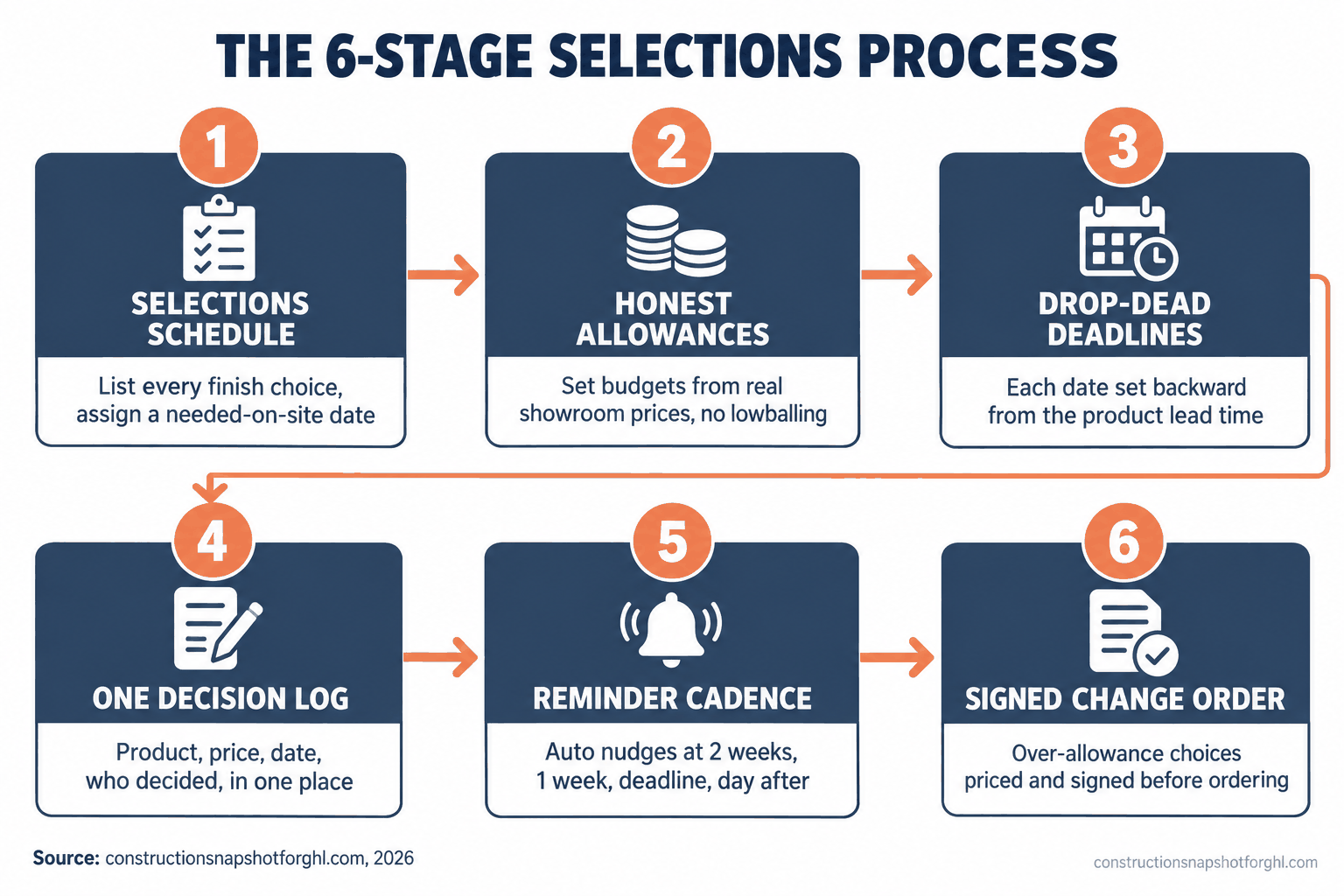
Here is the system, start to finish. Each stage exists to close one specific gap where selections normally break down, and each has a failure mode I have watched sink otherwise good builders.
Stage 1: Build the selections schedule before you break ground. Before the first shovel, list every category the client has to choose and assign each one a “needed on site” date from your construction schedule. Windows and exterior doors first, because they gate framing and dry-in. Then cabinets, tile, and plumbing fixtures, which drive rough-in. Finishes like paint, hardware, and light fixtures come last. This is a pre-construction task, done at the same table where you finalize the contract, not a thing you start once the crew is on site. Where it breaks: builders who treat selections as a during-construction activity. By the time you are “getting to” the window selection, framing is already waiting on it.
Stage 2: Set honest allowances from real quotes. Every category the client has not chosen yet carries an allowance in the contract. The single most damaging thing you can do is lowball it to make the bid look competitive. A $4,000 tile allowance on a job where the client’s Pinterest board is clearly $9,000 of tile is not a budget, it is a guaranteed overage and a guaranteed fight. Walk a showroom, pull real prices, and set allowances the client can actually hit for the look they want. Where it breaks: the lowball allowance. It wins you the job and then poisons it, because every selection becomes bad news and the client decides you either did not know your numbers or hid the ball.
Stage 3: Give every selection a drop-dead deadline tied to its lead time. A deadline is not “sometime before we need it.” It is a date, calculated backward: the day the trade installs it, minus the product’s lead time, minus a buffer for a re-selection if the first choice is unavailable. Cabinets running an eight-week lead time on a job where they install in week twelve means the selection is due, locked, and ordered by week three, not week eleven. Put every date in writing and make the client acknowledge it. Where it breaks: the vague deadline. “We’ll need that soon” gets ignored by a busy homeowner every time. A dated, lead-time-backed deadline gives the client a real reason to move and gives you a clean record when they do not.
Stage 4: Keep one decision log everyone can see. Every selection lives in one place: the product, the price, the allowance, the date decided, and who decided it. Not a text thread, not your inbox, not a memory. When a client says “I never approved that tile,” a dated log with their sign-off ends the conversation in ten seconds. A shared client portal does this best, because the client sees the same list you do and cannot claim they were never told. Where it breaks: selections made verbally on the jobsite. A hallway conversation about swapping a fixture, never written down, is a dispute waiting to happen and usually a freebie you did not mean to give.
Stage 5: Run a reminder cadence, do not chase by memory. This is the stage that makes or breaks the other five. A selection with a deadline still needs someone to nudge the client as the date approaches, and if that someone is you, remembering between jobsite visits, it will slip. Build a cadence: a heads-up two weeks out, a reminder one week out, a firm “this is now blocking the schedule” on the deadline, and an escalation the day after. The exact messages are below. Where it breaks: the manual chase. You mean to remind them, you are on a roof, the day passes, and now the decision is late and it is partly your fault. Automating the reminder is the single biggest fix in the whole system.
Stage 6: When a selection moves the price, make it a signed change order. The moment a client picks something above the allowance, or adds a category that was not in the contract, that is a change order, not a verbal “we’ll sort it out.” Price it, write it up, and get it signed before you order the product. This protects your margin and, in several states, it is the law. In California, a home-improvement contract and any change to it must be in writing and signed by both parties before the covered work begins (California BPC 7159). Where it breaks: the “I’ll add it to the final bill” habit. Unpriced overages stack up invisibly and land as one ugly closeout invoice, which is exactly how a happy client turns into a bad review. Handle each one as its own signed, priced step.
The selections schedule, drawn out
The point of Stage 1 is easier to see on a timeline. Each selection has to be locked at the point in the build where the trade that installs it needs it on site, not whenever the client feels ready.
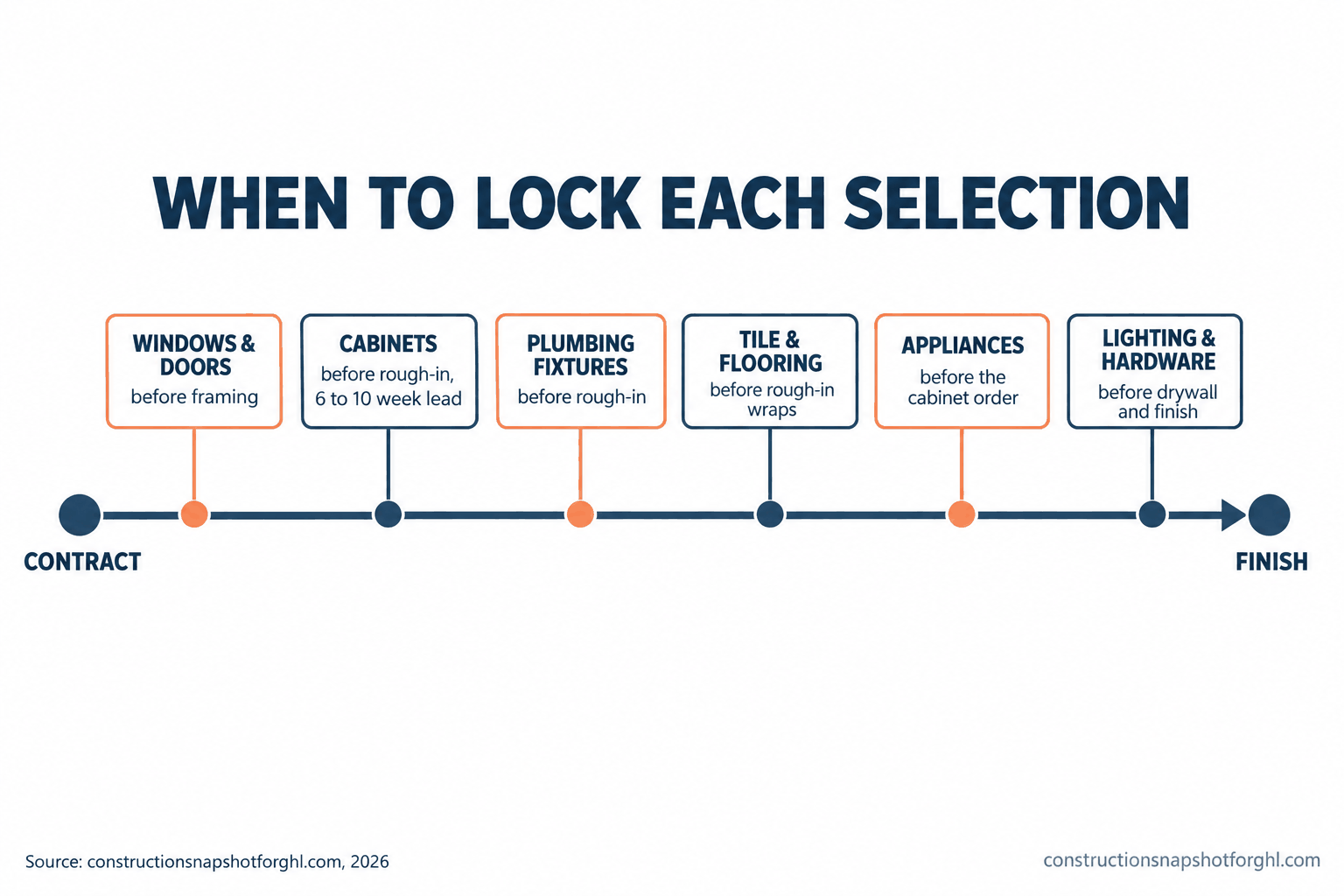
The same schedule laid out as a table makes the deadlines concrete. This is a representative selections schedule for a mid-size remodel or custom home, showing when each category should be locked relative to its trade and why it cannot wait.
Representative selections schedule (illustrative)
| Feature | Lock the selection by | Why it is long-lead |
|---|---|---|
| Windows & exterior doors | Before framing starts | Rough openings depend on the unit; custom sizes run weeks |
| Cabinets & vanities | Early, before rough-in | Semi-custom and custom cabinets commonly run 6-10+ weeks |
| Plumbing fixtures | Before rough-in | Valve bodies must be on site to rough in walls correctly |
| Tile & flooring | Before rough-in wraps | Layout affects blocking; specialty tile can be back-ordered |
| Appliances | Before cabinet order | Panel-ready and pro units drive cabinet dimensions and lead times |
| Lighting & hardware | Before drywall/finish | Shorter lead time, but stalls trim and final if left too late |
Treat the “lock by” column as the deadline that drives Stage 3. Every date on it is set by the trade that installs the item, not by when the client feels ready. Most homeowners can get through their selections in eight to ten weeks when they have a schedule to follow (Stauffer & Sons), which is plenty of runway if you start at contract signing and completely impossible if you start at framing.
Steal this: the selection reminder cadence
The schedule is only as good as the follow-up. Here is the exact cadence, ready to send, that moves a client from “I’ll get to it” to a locked decision without you nagging in person.
Send these by hand and they work. The problem is that “by hand” is exactly what fails on a busy week. The smartest move most builders can make is to fire the two-week and one-week reminders automatically off the selection’s deadline, so the nudge never depends on you remembering between jobsites. That is the same follow-up discipline that decides whether your estimates ever get signed, applied to the decisions that stall the build instead of the ones that win it.
Run it three ways: solo, mid-size, and large
The right selections process depends on your size, because who does the chasing and how many clients you juggle changes everything.
The solo operator or small remodeler (6 to 12 jobs a year). You are the selections coordinator, the estimator, and the guy on the roof, so your process has to survive you being unavailable half the day. Keep the category list short and the allowances honest, and lean hardest on Stage 5: if any part of this gets automated, make it the reminders, because you are the bottleneck the day a client goes quiet. On smaller kitchen and bath remodels, a tight ten-category selection sheet with dated deadlines and automatic nudges will do more for your schedule than any scheduling software.
The mid-size design-build or remodeling firm (15 to 25 jobs). You are running several builds at once, so a stalled selection on one job quietly steals attention from the others. Standardize the selection schedule across every contract so your office is not reinventing it per job, and give one person clear ownership of the decision log. This is the tier where a shared client portal and an automated reminder cadence pay for themselves fastest, because the leak is not one dramatic delay, it is a few days lost on every job, every month, spread thin enough that nobody notices it adding up.
The larger custom builder (30 to 40 jobs). Now selections are a formal pre-construction phase, often run with a designer or a dedicated selections coordinator before the build even starts. The risk shifts from “the client is slow” to “the process is inconsistent across a dozen jobs and two coordinators.” Lock the schedule, the allowance methodology, and the change-order rule into a documented standard everybody follows, and treat the homeowner communication rhythm around selections as seriously as you treat the build schedule itself. At this scale, a consistent selections process is a competitive advantage clients feel and repeat.
The rules that turn a selection into a legal document
A selection that changes the price is not just a budget event, it is a legal one, and a few rules bite hard depending on where you build. This is not legal advice and the rules vary by state, so confirm yours before you finalize a contract or a change-order template.
Change orders must be in writing. In California, a home-improvement contract and any change to it must be in writing and signed by both parties before the covered work begins, and the change order has to describe the scope, the added or subtracted cost, and the effect on the payment schedule (California BPC 7159). That makes the “I’ll add it to the final bill” habit not just risky but a violation. Bake a signed change order into Stage 6 and you are compliant by default.
In-home selection closes carry a cancellation window. If you close a sale or a significant upgrade at the client’s home or at a showroom that is not your permanent place of business, the FTC Cooling-Off Rule gives the buyer three business days to cancel most sales of $25 or more made at their home (FTC). If your selections happen at the kitchen table, know that the clock exists and provide the required notice.
Licensing details still apply to selections work. In California your CSLB license number is required on your contracts and advertising (California BPC 7030.5), and the license threshold rose to work of $1,000 or more under AB 2622, up from the old $500 line many contractors still quote. Texas, by contrast, has no statewide general-contractor license and pushes registration to the city. A selection upgrade that pushes a small job over a threshold, or a change order on a licensed job, has to respect the same rules the base contract does.
Common objections
“My clients would feel rushed by hard deadlines.” They feel rushed by surprises, not by structure. A dated selection schedule handed over at contract signing is the most reassuring thing you can give a nervous homeowner, because it tells them exactly what to decide and when, with no ambush. The clients who resist a schedule are usually the ones who were going to stall anyway, and a documented deadline is precisely what protects you from them. Present it as their roadmap, not your rulebook.
“I already use Buildertrend or JobTread, doesn’t it handle selections?” Your project-management tool can store a selection sheet and a client portal, and the good ones do it well. What it does not do on its own is chase the client the day a decision goes quiet, or make you send the reminder while you are on a jobsite. The leak is rarely the software’s selection feature. It is the human follow-up that never happens, which is a workflow problem, not a storage problem.
“Isn’t this just more admin I don’t have time for?” It is less admin, moved earlier. The time you spend building a selection schedule once at contract signing is a fraction of the time you lose re-sequencing a build around a late window, re-quoting an upgrade you never priced, and calming a client who is watching their job sit still. Front-loaded selections are the cheapest hour of admin you will spend on the whole job.
“What if the client changes their mind after they’ve locked it?” Then it is a change order, priced and signed before you re-order, same as Stage 6. Locking a selection does not forbid a change, it just means the change gets handled as a real transaction instead of a favor. That protects both of you: the client knows the cost before committing, and you never eat a swap you did not agree to.
Where to start this week
Pull your next job’s contract and list every category the client still has to choose. For each one, write the date the trade needs it and count backward past the lead time to a lock date. That single sheet, dates and allowances in one place, is 80 percent of the system. Then fix the part that actually costs you: decide how the two-week and one-week reminders get sent every time without you remembering. Nail those two things and client indecision stops being your schedule problem. That reminder-and-escalation piece is exactly what the Construction Snapshot for GoHighLevel automates, and you can hand the whole selections cadence to a trained GHL VA if you would rather never chase a decision by hand again.
Frequently asked questions
What is a construction selections process?
A construction selections process is the system a builder uses to get every finish decision, from windows and cabinets to tile, fixtures, and hardware, made and locked before the build needs it. It ties three things together that are usually kept separate: the construction schedule (when each trade needs the product), the budget (the allowance for each category), and the client's decision. A real process assigns every selection an allowance, a deadline tied to its lead time, one place the choice is recorded, and a rule that turns any over-allowance choice into a signed change order before anything is ordered.
What is the difference between a selection and an allowance?
A selection is the actual product the client chooses, such as a specific faucet, tile, or cabinet line. An allowance is the dollar figure the builder carried in the contract for a category the client had not chosen yet, a placeholder that let the job be priced before every product was picked. The selection either lands within the allowance or exceeds it, and the gap between the two is where most selection disputes start. Honest allowances set from real showroom prices keep that gap small.
How do I stop clients from making selections late?
Give every selection a dated deadline calculated backward from when the trade installs it, minus the product's lead time, minus a buffer, and set those dates at contract signing rather than during construction. Then run a reminder cadence: a heads-up two weeks out, a reminder one week out, a firm message on the deadline, and an escalation the day after. Tie every reminder to the crew's schedule so the client understands a late decision delays the whole build, not just one item. Automating those reminders is the single biggest fix.
When does a selection become a change order?
A selection becomes a change order the moment the client chooses something above the contract allowance, or adds a category that was not in the original scope. At that point it should be priced, written up, and signed before the product is ordered. In California, a home-improvement contract and any change to it must be in writing and signed by both parties before the covered work begins (Business and Professions Code 7159), so a verbal 'we'll add it to the final bill' is both a margin risk and, in some states, a compliance violation.
What are the longest-lead selections I should lock first?
Windows and exterior doors usually come first because rough openings depend on the unit and custom sizes run several weeks. Cabinets and vanities are next, with semi-custom and custom lines commonly running six to ten weeks or more, followed by plumbing fixtures whose valve bodies must be on site to rough in walls. Appliances often drive cabinet dimensions, so they should be chosen before the cabinet order. Lighting, hardware, and paint have shorter lead times but still stall trim and final if left too late.
How long should the selections process take?
Most homeowners can complete their selections within about eight to ten weeks when they are working from a schedule, though the pace depends on how quickly they decide and whether long-lead items are in stock. The key is to start at contract signing, not at framing. Beginning early gives clients the full runway and a clear order to decide in; starting late compresses dozens of decisions into the weeks when the crew is already waiting, which is exactly how selections stall a build.
Sources
- Houzz: 2026 U.S. Houzz & Home Study, Renovation Trends
- Stauffer & Sons: Making Selections When Building a Custom Home
- California BPC 7159 (home-improvement contracts and change orders in writing)
- California BPC 7030.5 (license number in advertising and contracts)
- FTC: Cooling-Off Rule for sales made at the buyer’s home
- NAHB: Three states drive over 20% of remodeling activity (Aug 2026)
- JCHS: Remodeling growth set to downshift in late 2026 (LIRA)